Command friendly AI what to do.
markline is a lightweight, in-mission ME CLI for DCS, converting F10 map markers into live AI behaviour.
Overview
Simple to adopt.
markline maps F10 marker text to a parsed CLI input, so you can start building AI behaviour with little interference between you and the player.
Predictable behaviour.
A unified parser with customisable command schema, type defaults and event bindings mean every command is consistently tracked across all marker states.
Easily modifiable.
The command schema is defined by a Lua table schema and callback handler. Add new behaviour to the parser without modifying scripting engine code.
Command Schema
What makes markline so powerful is how easy and simple it is to create commands.
The Options table represents a command schema, containing any potential parameters and choices.
-- Sends out a smoke grenade or flare with colour of choice.
Options.pop = {
  description = "Sends out a smoke grenade or flare with colour of choice.",
  flags = {
    c = {
      type = "any",
      description = "The colour you want the smoke/flare to be.",
      choices = { "red", "green", "white" },
      default = "white"
    },
    f = {
      type = "boolean",
      description = "Is this a flare?",
      choices = nil,
      default = false
    }
  }
}
Data Structure
- Options.<name>
- Command key only allowing alphanumerics (A-Z/0-9) and underscore, or
tokens[2]. - description
- Shown in the generated help text from
Context:help(). - flags
- Optional table of flag definitions, the key is the name. (the part after
-/--) - flags[k].type
- A string of built-in literals. This sanitises input and helps prevent value type mismatch.
- flags[k].choices
- Only allowed choices. If the parsed value isn't in the list,
parseArgumentsraises an error. - flags[k].default
- Used when a flag is present with no value, falls back to a predetermined value or type.
| Type | Default |
|---|---|
| number | 0 |
| boolean | true |
| string / any | "" |
| nil | nil |
Built-In Commands
Builds and returns a help string listing every registered command, its description, each flag's type, choices and default. Generated by the Options table structure via Context:help().
A pseudocode function for representing callbacks. (speed, surface type, formation type) Context:move(ctx) itself is a placeholder, meant to later work with cmdr.
| Flag | Type | Choices | Default |
|---|---|---|---|
| --s | number | 9 | |
| --t | string | onroad, offroad | offroad |
| --f | string | cone, column, diamond, vee | column |
Event Lifecycle
Markers are activated by "world" (in-mission) events and tracked for you, simplifying the process.
Fired once when a marker is first placed on the map, triggering cli:onCreate().
Fired when an existing marker's text is edited in place, triggering cli:onUpdate().
Fired when a marker is deleted, triggering cli:onDelete(). Useful for commands that need a two-step verification process.
Runs regardless of the marker state, best for hooking commands like ping.
Try It Yourself
Try out our live playground with the example commands provided to see how input and schema are affected.
Command Example
Marker text
Parsed Result
Getting Started
Create a mission script.
mark.cli() is the user-facing entrypoint for all world.addEventHandler usage.
-- mission_script.lua

local cli = mark.cli()

-- Handle a simple marker command.
cli:on("test", function(ctx)
    print("received!") -- dcs.log
end)
function(ctx) is a callback that is hooked to the in-mission event handler. A singular Context argument is provided per command, containing the parsed result.
Load it in the Mission Editor.
Create a ONCE, ON MISSION START trigger with two DO SCRIPT FILE actions as shown.
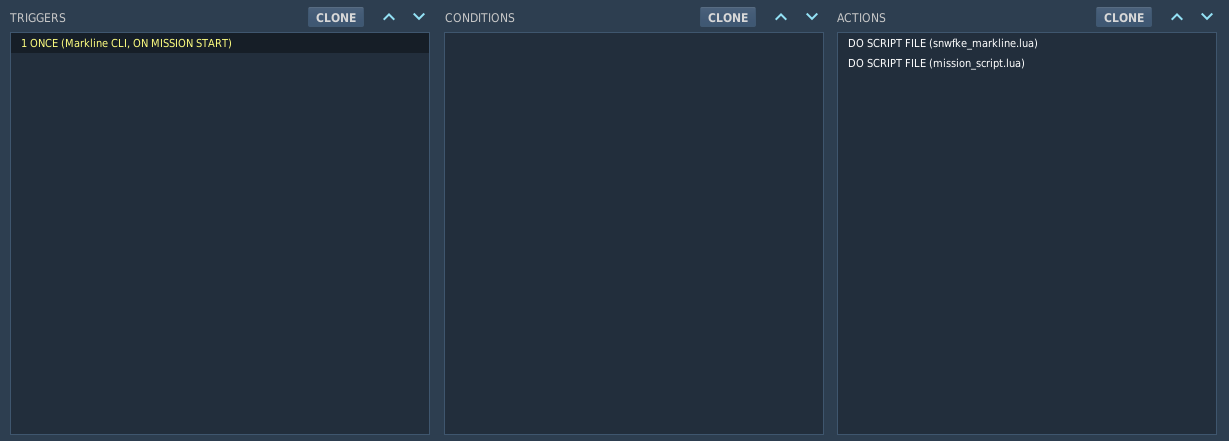
mark namespace won't be found. If you edit either file, re-add it in the trigger and save the mission again.